
I’ve recently been working on a project deploying an Azure Enterprise-Scale Landing Zone (ELZ) architecture using Terraform, along with a raft of automation and security guardrails. As the newer Azure Verified Modules (AVM) had just gone GA and begun to get some traction, I decided to give these a whirl!
This article will give you a bit of an introduction and guidance on one of those modules - avm-ptn-alz.
Overview
As part of an Azure ELZ deployment there are a number of key areas that need to be built. This includes things such as:
- Management Group Structure
- Policies and Assignments
- Management Resources
- Hub Networking and Security
Historically there has been a “monolith” module that would take care of lots of these which many of you may have come across - the caf-enterprise-scale module. Browse to that module now though, and you’ll be greeted with the following warning:

The newer AVM approach has broken this up into a number of smaller modules, such as:
- avm-ptn-alz - To deploy management group structure, Azure policy and assignments, role definitions and RBAC.
- avm-ptn-hubnetworking - To deploy the hub network, and any associated resources such as Azure Firewall etc.
- avm-ptn-alz-management - To deploy central Log Analytics Workspace, Data Collection Rules etc. and Automation Account.
In this article, we are going to focus on the avm-ptn-alz module, and talk about how you can deploy and tune it. We aren’t going to be focusing on the “why” of ELZs.
It took a little poking around the docs (and a helpful call with Matt White @Microsoft!) to get myself up to speed on how to handle the way this module works, so I wanted to try and save others some time.
Due to personal time constraints, I’m going to split this into two parts:
- Part One (this article!) - We will look at a basic deployment, adjusting policy parameters, changing naming and overriding some policy assignments!
- Part Two - We will get a little more advanced, creating some new policies and changing existing ones, as well as looking at some new role definitions and assignments. This can be found here.
A Basic Deployment
Let’s get started with a basic deployment, using some pre-created subscriptions.
terraform {
  required_providers {
    azapi = {
      source  = "azure/azapi"
      version = "2.3.0"
    }
    modtm = {
      source  = "azure/modtm"
      version = "0.3.5"
    }
    random = {
      source  = "hashicorp/random"
      version = "3.7.2"
    }
    time = {
      source  = "hashicorp/time"
      version = "0.13.0"
    }
    alz = {
      source  = "azure/alz"
      version = "0.17.4"
    }
  }
}

provider "alz" {
  library_references = [
    {
      path = "platform/alz"
      ref  = "2025.02.0"
    }
  ]
}

data "azapi_client_config" "current" {}


module "avm-ptn-alz" {
  source             = "Azure/avm-ptn-alz/azurerm"
  version            = "0.12.0"
  architecture_name  = "alz"
  location           = "uksouth"
  parent_resource_id = data.azapi_client_config.current.tenant_id
  subscription_placement = {
    management = {
      subscription_id       = "8661d1f5-868c-4760-90cc-7443711cff65"
      management_group_name = "management"
    }
    connectivity = {
      subscription_id       = "165cba3b-8642-4aa1-bbab-35e1140dd81b"
      management_group_name = "connectivity"
    }
    identity = {
      subscription_id       = "4595d981-87d1-4772-bd3a-1f5471da6c24"
      management_group_name = "identity"
    }
  }
  management_group_hierarchy_settings = {
    default_management_group_name            = "sandbox"
    require_authorisation_for_group_creation = true
  }
}
Pretty self-explanatory on the whole. With only a few inputs, we are creating the management group structure, moving subscriptions into them and creating a whole load of different policies, assignments and service principals for remediation actions.
One area that is probably worth a little explanation, is this:
provider "alz" {
  library_references = [
    {
      path = "platform/alz"
      ref  = "2025.01.0"
    }
  ]
}
This module has decoupled the policy definitions and assignments from the Terraform module itself, allowing the authors to update each independently. The new ALZ provider does the heavy lifting for you.
The configuration block above is telling the alz provider to download a specific version of the policy library which can be found at the following GitHub page - https://github.com/Azure/Azure-Landing-Zones-Library/tags.
A quick terraform apply later (it may not succeed first time), and we have our structure built out, and a whole load of policies in place!


If you’re like me though, you may be thinking…
“Hmmm… I want to change the name of the Azure Landing Zone management group”.
Well, read on!
Customising Display Names
This may seem a little pedantic, but let’s be honest, we all like things named a certain way!
As we’ve covered already, much of the configuration that is deployed is decoupled from the Terraform module. The alz provider is downloading the naming, structure and policies from the library - so how do we override that?
We can add an additional URL to the alz provider block so that it also considers other sources. In this instance, I’m telling it to check in a local folder called lib, but this could be hosted elsewhere.
provider "alz" {
  library_references = [
    {
      path = "platform/alz"
      ref  = "2025.01.0"
    },
    {
      custom_url = "${path.root}/lib"
    }
  ]
}
Let’s start simple and just change the name of the pseudoroot management group. To do this, we need to create our own custom architecture definition. I’m going to call it “custom-alz”.
Under the lib folder, I create a new directory called archetype_overrides (the directory name isn’t important) and a file called custom_alz.alz_architecture_definition.json. Unlike the directory name, the file naming is important. The provider is specifically going to look for files ending with .alz_architecture_definition.json.
I’ve populated the file with the following:
{
  "schema": "https://raw.githubusercontent.com/Azure/Azure-Landing-Zones-Library/main/schemas/architecture_definition.json",
  "name": "custom-alz",
  "management_groups": [
    {
      "archetypes": ["root"],
      "display_name": "MikeGuy ELZ root",
      "exists": false,
      "id": "mikeguyroot",
      "parent_id": null
    },
    {
      "archetypes": ["landing_zones"],
      "display_name": "Landing zones",
      "exists": false,
      "id": "landingzones",
      "parent_id": "mikeguyroot"
    },
    {
      "archetypes": ["corp"],
      "display_name": "Corp",
      "exists": false,
      "id": "corp",
      "parent_id": "landingzones"
    },
    {
      "archetypes": ["online"],
      "display_name": "Online",
      "exists": false,
      "id": "online",
      "parent_id": "landingzones"
    },
    {
      "archetypes": ["platform"],
      "display_name": "Platform",
      "exists": false,
      "id": "platform",
      "parent_id": "mikeguyroot"
    },
    {
      "archetypes": ["sandbox"],
      "display_name": "Sandbox",
      "exists": false,
      "id": "sandbox",
      "parent_id": "mikeguyroot"
    },
    {
      "archetypes": ["management"],
      "display_name": "Management",
      "exists": false,
      "id": "management",
      "parent_id": "platform"
    },
    {
      "archetypes": ["connectivity"],
      "display_name": "Connectivity",
      "exists": false,
      "id": "connectivity",
      "parent_id": "platform"
    },
    {
      "archetypes": ["identity"],
      "display_name": "Identity",
      "exists": false,
      "id": "identity",
      "parent_id": "platform"
    }
  ]
}
I’m now going to change my module inputs to reference this new architecture.
module "avm-ptn-alz" {
  source             = "Azure/avm-ptn-alz/azurerm"
  version            = "0.12.0"
  architecture_name  = "custom-alz"  # Notice this has changed
  location           = "uksouth"
  ...
To avoid any potential errors, I’m going to run a destroy and then a clean apply. Once this succeeds, we now have our new naming structure in place. Nothing else has really changed here. We’ve simply overridden the naming for the archetype “root”.

Customising Assignment Parameters
“It all looks great, but there are a bunch of policies I don’t want enabled…”
The next thing you’re likely to want to do, is start tweaking which policies are assigned and possibly what parameters are passed to them. Let’s start with the easier of the two - changing the parameters passed to assignments.
For this, you don’t need to start creating any additional custom json files. We can simply use some inputs in the module to pass in values. Let’s say I want to make some changes to the default values of the Enforce Guardrails for Key Vault initiative. My module inputs may look something like this:
module "avm-ptn-alz" {
  source             = "Azure/avm-ptn-alz/azurerm"
  version            = "0.12.0"
  architecture_name  = "custom-alz"
  location           = "uksouth"
  parent_resource_id = data.azapi_client_config.current.tenant_id
  subscription_placement = {
    management = {
      subscription_id       = "8661d1f5-868c-4760-90cc-7443711cff65"
      management_group_name = "management"
    }
    connectivity = {
      subscription_id       = "165cba3b-8642-4aa1-bbab-35e1140dd81b"
      management_group_name = "connectivity"
    }
    identity = {
      subscription_id       = "4595d981-87d1-4772-bd3a-1f5471da6c24"
      management_group_name = "identity"
    }
  }
  management_group_hierarchy_settings = {
    default_management_group_name            = "sandbox"
    require_authorisation_for_group_creation = true
  }
  policy_assignments_to_modify = {
    landingzones = {
      policy_assignments = {
        Enforce-GR-KeyVault = {
          parameters = {
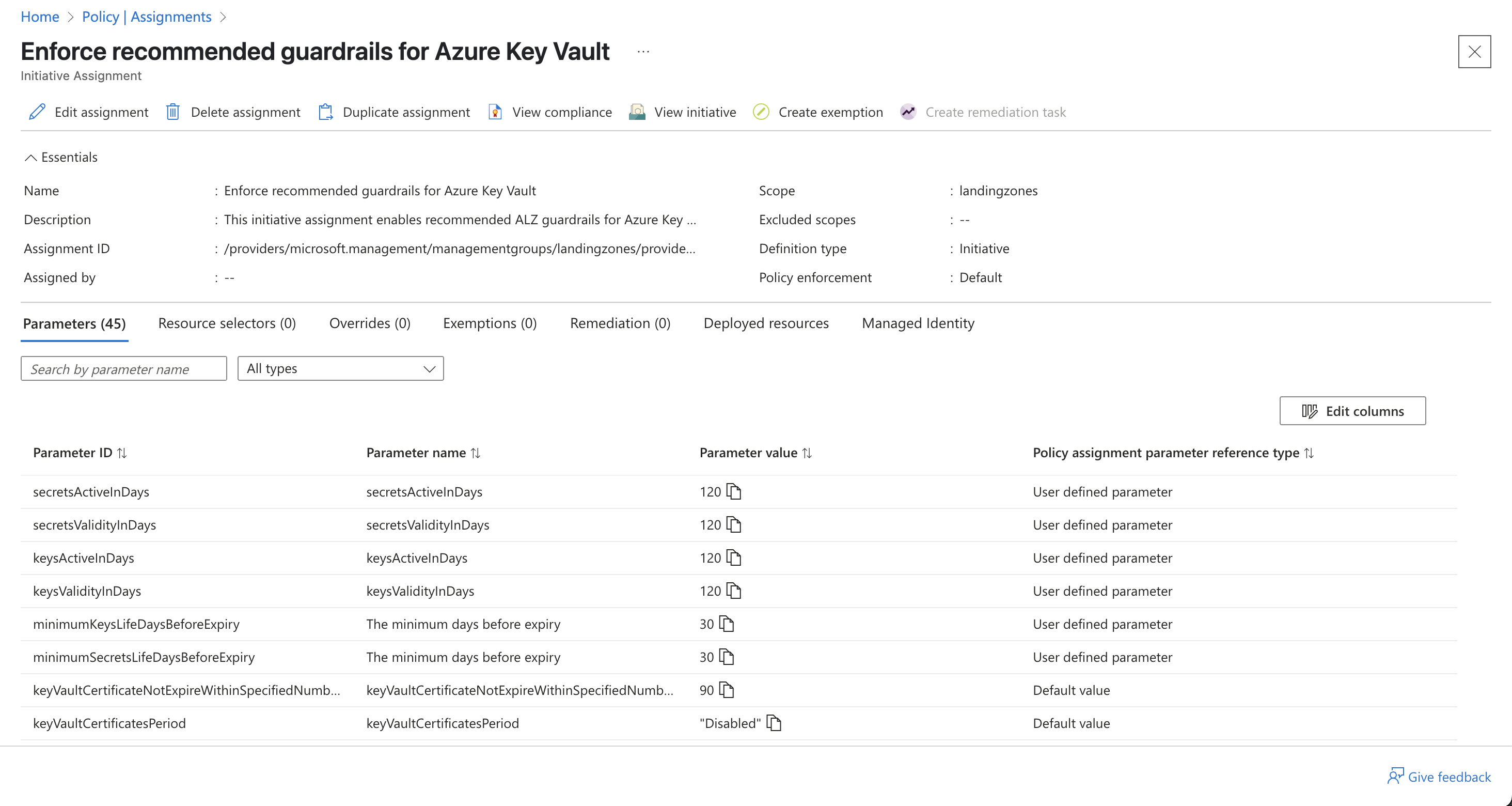
            secretsActiveInDays                = jsonencode({ value = 120 })
            secretsValidityInDays              = jsonencode({ value = 120 })
            keysActiveInDays                   = jsonencode({ value = 120 })
            keysValidityInDays                 = jsonencode({ value = 120 })
            minimumSecretsLifeDaysBeforeExpiry = jsonencode({ value = 30 })
            minimumKeysLifeDaysBeforeExpiry    = jsonencode({ value = 30 })
          }
        }
      }
    }
  }
}
Finding out what you need to use for keys takes a little bit of poking about! My top tip is to use the names in state and the library repo to work out what’s what. Once you get the hang of where to look, you’ll be tweaking inputs nice and quickly.
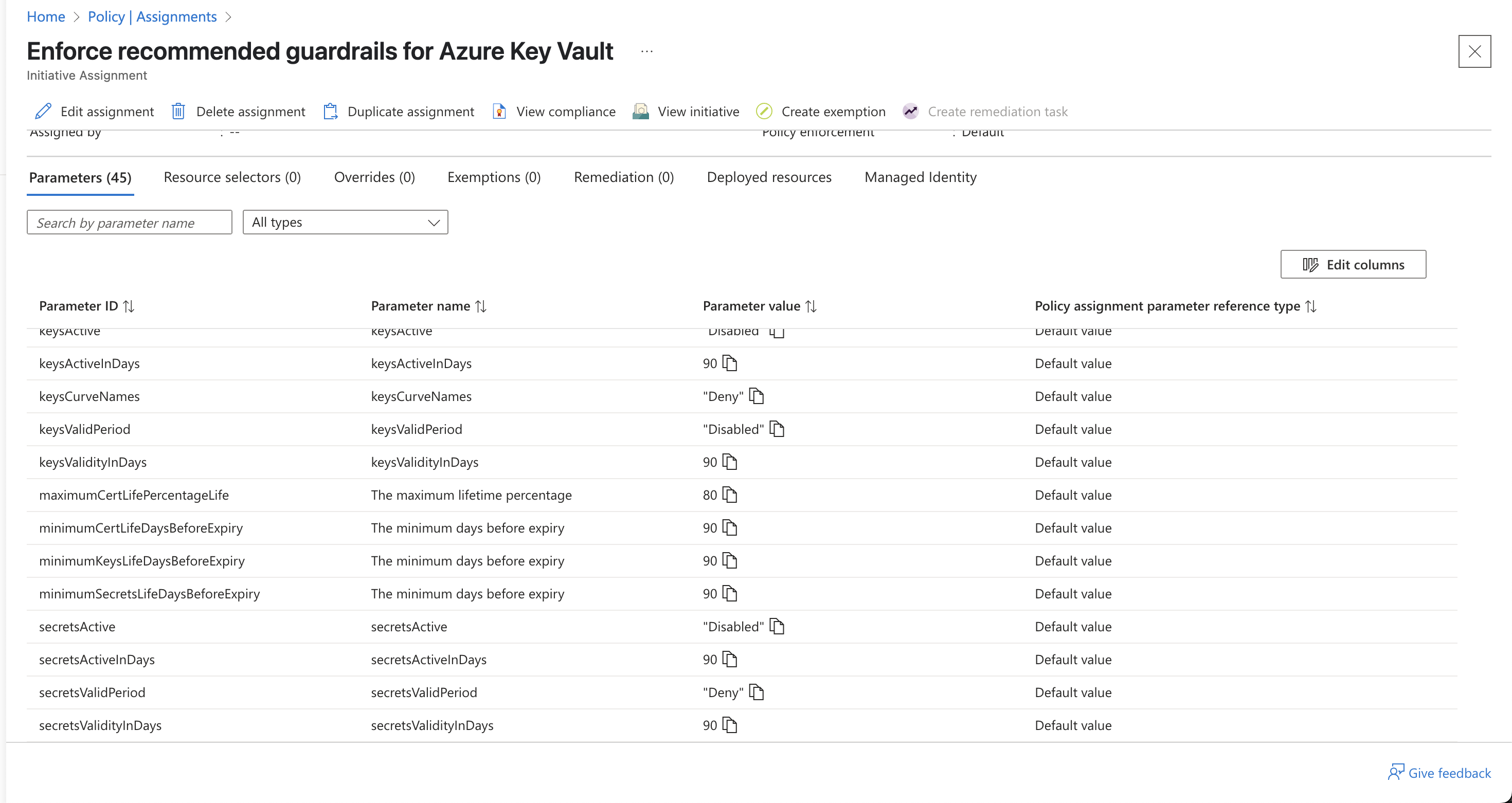
Before the change, we can see many of these parameters were set to 90…
After the change, our overrides have taken effect…
Customising Policy Assignments
Another common thing you’re likely to want to do, is to remove certain policies that aren’t applicable. To do this, we are going to have to go back to our JSON files.
We need to create an archetype override and then update our custom architecture definition to use it instead of the default. It should make sense when I show you.
Let’s start by creating two new files - landingzones.alz_archetype_override.json and root.alz_archetype_override.json. Both are under the lib/archetype_overrides folder, but again, it doesn’t matter.
We are going to remove some policies from each. The files are shown below:
# landingzones.alz_archetype_override.json

{
  "name": "landing_zones_override",
  "base_archetype": "landing_zones",
  "policy_assignments_to_add": [],
  "policy_assignments_to_remove": ["Enable-DDoS-VNET"],
  "policy_definitions_to_add": [],
  "policy_definitions_to_remove": [],
  "policy_set_definitions_to_add": [],
  "policy_set_definitions_to_remove": [],
  "role_definitions_to_add": [],
  "role_definitions_to_remove": []
}
# root.alz_archetype_override.json

{
  "name": "root_override",
  "base_archetype": "root",
  "policy_assignments_to_add": [],
  "policy_assignments_to_remove": [
    "Deploy-MDEndpoints",
    "Deploy-MDEndpointsAMA",
    "Deploy-MDFC-OssDb",
    "Deploy-MDFC-SqlAtp",
    "Deploy-MDFC-Config-H224"
  ],
  "policy_definitions_to_add": [],
  "policy_definitions_to_remove": [],
  "policy_set_definitions_to_add": [],
  "policy_set_definitions_to_remove": [],
  "role_definitions_to_add": [],
  "role_definitions_to_remove": []
}
We are removing some policy assignments related to Microsoft Defender for Cloud from our root-level assignments, and the DDoS policy from our landing zone-level assignments. As you can see, you can do similar for definitions, policies, initiatives (policy sets) and roles. We will come to those in part two!
Notice that we have defined a name of root_override and landing_zones_override. As it stands, nothing is going to change if we re-run our Terraform. We now need to go and update our custom architecture definition to use these new names.
Going back to our custom_alz.alz_architecture_definition.json file, let’s update it…
{
  "schema": "https://raw.githubusercontent.com/Azure/Azure-Landing-Zones-Library/main/schemas/architecture_definition.json",
  "name": "custom-alz",
  "management_groups": [
    {
      "archetypes": ["root_override"],  # Notice this has changed
      "display_name": "MikeGuy ELZ root",
      "exists": false,
      "id": "mikeguyroot",
      "parent_id": null
    },
    {
      "archetypes": ["landing_zones_override"],  # Notice this has changed
      "display_name": "Landing zones",
      "exists": false,
      "id": "landingzones",
      "parent_id": "mikeguyroot"
    },
    {
      "archetypes": ["corp"],
      "display_name": "Corp",
      "exists": false,
      "id": "corp",
      "parent_id": "landingzones"
    },
    {
      "archetypes": ["online"],
      "display_name": "Online",
      "exists": false,
      "id": "online",
      "parent_id": "landingzones"
    },
    {
      "archetypes": ["platform"],
      "display_name": "Platform",
      "exists": false,
      "id": "platform",
      "parent_id": "mikeguyroot"
    },
    {
      "archetypes": ["sandbox"],
      "display_name": "Sandbox",
      "exists": false,
      "id": "sandbox",
      "parent_id": "mikeguyroot"
    },
    {
      "archetypes": ["management"],
      "display_name": "Management",
      "exists": false,
      "id": "management",
      "parent_id": "platform"
    },
    {
      "archetypes": ["connectivity"],
      "display_name": "Connectivity",
      "exists": false,
      "id": "connectivity",
      "parent_id": "platform"
    },
    {
      "archetypes": ["identity"],
      "display_name": "Identity",
      "exists": false,
      "id": "identity",
      "parent_id": "platform"
    }
  ]
}
Let’s re-run Terraform…
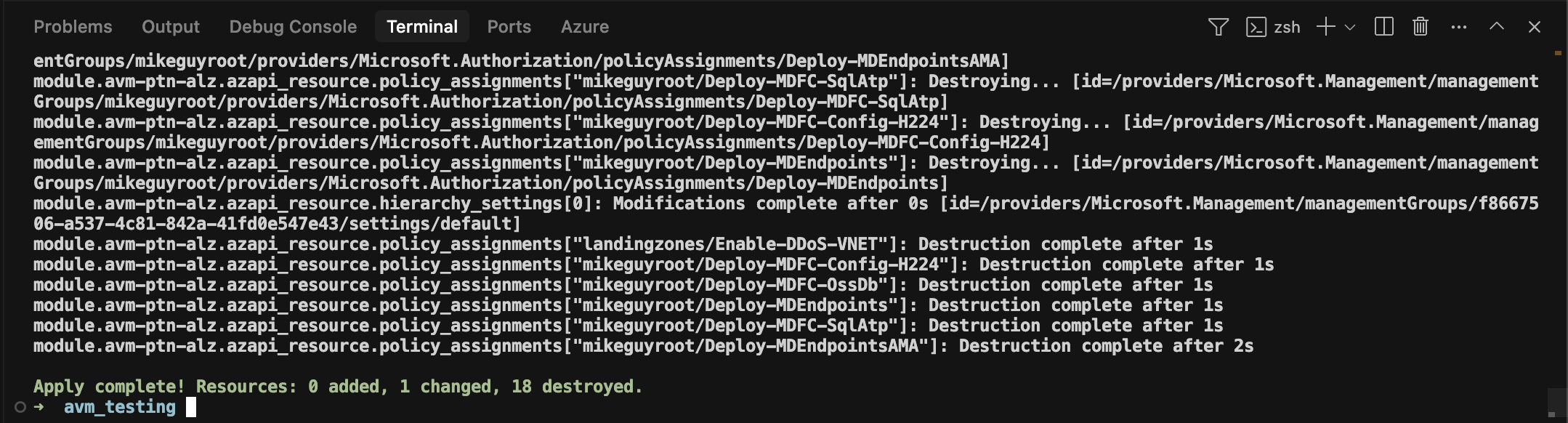
And there we have it! We’ve tweaked our policy assignments to fit our needs. As you will have seen from the earlier code snippets, there are more changes we can make with these archetype overrides. Some are self-explanatory, some are not.
But, I’ve run out of time for today, so you’ll have to wait for part two, when we get a little further into the weeds 😊
Summary
The newer AVM modules break up the existing larger monolith, and make it easier to quickly and easily deploy a good baseline to Azure environments. They do need tweaking to your environment however, and there is a bit of a learning curve compared to some other Terraform modules, just because you have to start playing about with additional JSON files.
Join me for part two soon, where we will get further into customising policies, initiatives, assignments and roles!